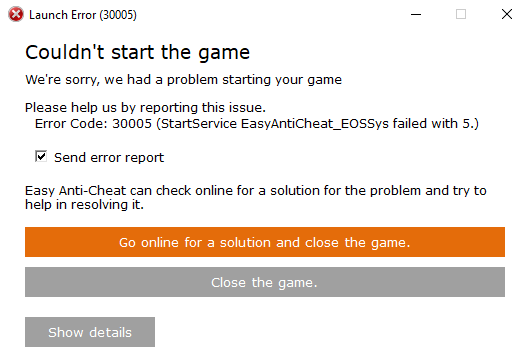
# Launch Error - StartService EasyAntiCheat\_EOSSys failed with 5.

<figure><img src="https://2163635389-files.gitbook.io/~/files/v0/b/gitbook-x-prod.appspot.com/o/spaces%2FlT4oo06dNP3aOVxQqDD9%2Fuploads%2Fgit-blob-ff621746a27a68f037b34deb4d1da0732b513e87%2Feossysfailedwith5.png?alt=media" alt="" width="398"><figcaption></figcaption></figure>

1. Run the [EAC Fix batch](https://github.com/livingflore/BattleBitEACFix/releases) (BattleBitEACFix.bat file).
2. Grant EAC full access for application packages in registry.

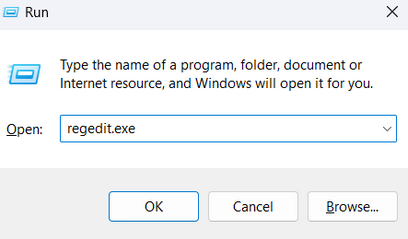
<figure><img src="https://2163635389-files.gitbook.io/~/files/v0/b/gitbook-x-prod.appspot.com/o/spaces%2FlT4oo06dNP3aOVxQqDD9%2Fuploads%2Fgit-blob-f21fef621499c0d19114f102a2411a3c2ccb9b23%2Frunregedit.png?alt=media" alt="" width="306"><figcaption><p>Press Win+R, type <code>regedit.exe</code> and press Enter.</p></figcaption></figure>

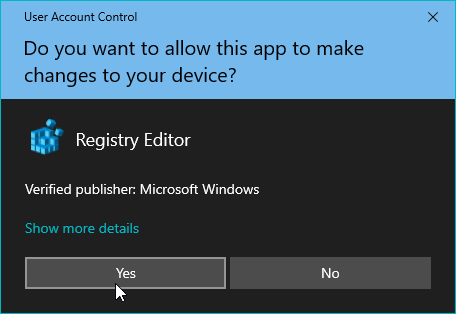
<figure><img src="https://2163635389-files.gitbook.io/~/files/v0/b/gitbook-x-prod.appspot.com/o/spaces%2FlT4oo06dNP3aOVxQqDD9%2Fuploads%2Fgit-blob-7f9eb4b7eda3f53e0fa5dae9c2eeb7bea0378c79%2Fuacregistry.png?alt=media" alt="" width="342"><figcaption><p>Press Yes.</p></figcaption></figure>

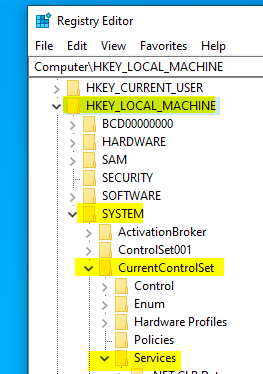
<figure><img src="https://2163635389-files.gitbook.io/~/files/v0/b/gitbook-x-prod.appspot.com/o/spaces%2FlT4oo06dNP3aOVxQqDD9%2Fuploads%2Fgit-blob-d88e163e9f81fa3239780f1976852a3c0b36ce2f%2Fregistrypath.png?alt=media" alt=""><figcaption><p>Go to <code>HKEY_LOCAL_MACHINE\SYSTEM\CurrentControlSet\Services\EasyAntiCheat_EOS</code>.</p></figcaption></figure>

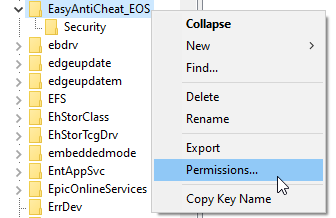
<figure><img src="https://2163635389-files.gitbook.io/~/files/v0/b/gitbook-x-prod.appspot.com/o/spaces%2FlT4oo06dNP3aOVxQqDD9%2Fuploads%2Fgit-blob-097484142458283de3253924670f6292cfd485d8%2Fpermissions.png?alt=media" alt=""><figcaption><p>Right click on <code>EasyAntiCheat_EOS</code>.</p></figcaption></figure>

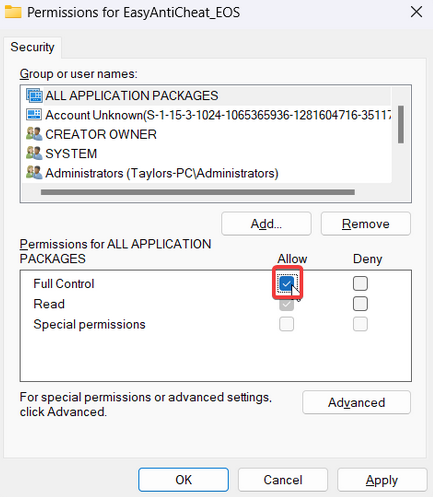
<figure><img src="https://2163635389-files.gitbook.io/~/files/v0/b/gitbook-x-prod.appspot.com/o/spaces%2FlT4oo06dNP3aOVxQqDD9%2Fuploads%2Fgit-blob-ef6a104d56fa7bd20da6e33252e2469cbabfbd3f%2Fgrantallapp.png?alt=media" alt="" width="325"><figcaption><p>Click on "Full Control" Allow checkbox under "ALL APPLICATION PACKAGES" group.</p></figcaption></figure>